20 Meter Fiber HDMI Cable with Removable Head 4k 144hz | 5.83mm head for small conduit
$69.11
$102.28
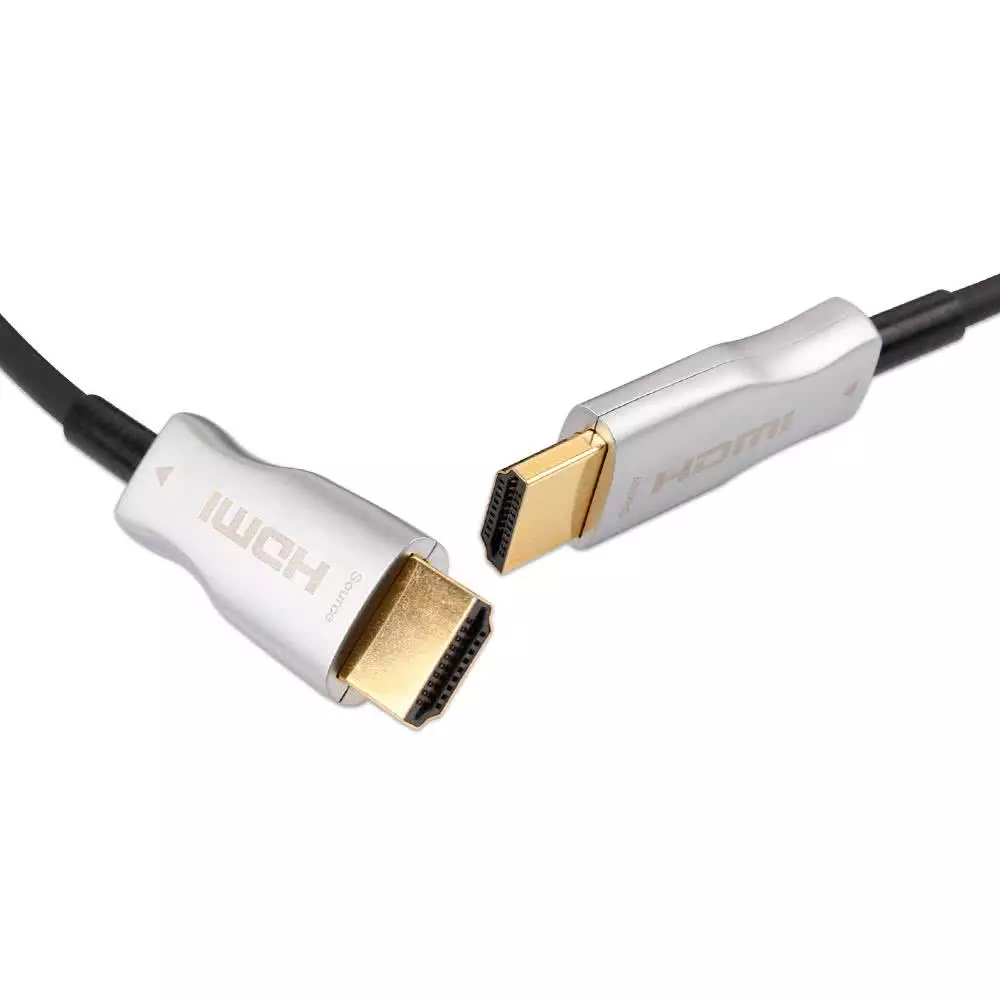
20 Meter Fiber HDMI Cable with Removable Head 4k 144hz | 5.83mm head for small conduit | 5.83mm head for small conduit Fiber Optic HDMI Cables can travel much longer distances due to the use of fiber optic light signal inside cables rather than copper wires. This cable features an 4K 144Hz capability and a 20-meter length, with a removable 5.83mm head designed for small conduits. Diameter & Specs on HDMI Cable: HDMI Certified: Yes HDMI Spec: v2.0, 4K 144hz CEC Compliant: Yes ROHS Compliant: Yes Support DVD Audio: Yes Support SACD: Yes Support True HD & DTS-HD: Yes Overall Diameter: 5mm Although these cables are HDMI v2.0 Certified we have tested 4K 144hz HDR (3840 x 2160) resolutions (HDMI v2.1 Resolutions) on the cables and it passes 100% at our stores using High-end Displays and Top-Tier Nvidia GPU’s. Below are HDCP Information on GPU/Monitor Detection. Fiber optic HDMI cables are excellent for long-distance, high-bandwidth (4K@144Hz/8K) transmission because they convert electrical signals to light. However, they are “active” cables that rely on power, which makes them susceptible to HDCP (High-bandwidth Digital Content Protection) handshake failures, leading to black screens, resolution drops, or refresh rate reductions. Why Fiber HDMI Causes Dropouts & HDCP Issues Insufficient Power: Active fiber cables require power (usually 5V) from the source device’s HDMI port. Many devices (specifically older receivers or source devices) cannot supply enough power, causing the cable to fail, particularly over long distances Handshake Failures: The HDCP handshake—where the source and display verify encryption Directionality: Fiber HDMI cables are directional. They must be connected with the “Source” end in the player and the “Display” end in the TV/Projector. Reversing them will cause a blank screen. Solutions for Fiber HDMI Problems Use a Power Inserter/Voltage Booster: If the cable is losing signal or showing black screens, it likely needs more power. A voltage inserter or a “Power HDMI” port on newer receivers can solve this. Check Cable Direction: Ensure the Source and Display ends are correctly plugged in. Verify HDCP Compatibility: Confirm that both the source (e.g., PS5/Apple TV) and display (e.g., Projector/TV) support the same HDCP version (preferably 2.2 or 2.3). Direct Connection: Bypass AV receivers or soundbars to test if they are causing the handshake failure. Power Cycle Devices: Unplug the HDMI cables and power-cycle the TV and source device, then plug them back in to force a fresh handshake. Update Firmware: Update the firmware on your TV or projector, as this often fixes handshake issues Specific Tips for High Refresh Rates (4K@144Hz) If experiencing issues with 4K@144Hz or 4K@60Hz with Dolby Vision, ensure your TV is set to HDMI Enhancement/Ultra HD Deep Color in the TV settings. In some cases, reducing the resolution or chroma subsampling (e.g., from 4:4:4 to 4:2:2) can temporarily stabilize a shaky connection. GPU/Monitor Refresh Rate Detection is up to the GPU and Monitor during HDCP handshake to determine max refresh rates. The cable just passes the signal that is detected by the GPU/Monitor. We tested 4K 144hz HDR in our test environments and can provide video of tests on request. This can differ based on GPU Driver/Monitor Driver and other factors below. For More information on HDCP which is implemented by the HDMI Specification please see blog at https://www.hdcabling.co.za/hdcp-hdmi-handshake-picture-sync-troubleshooting-and-guidelines/ The Indicated Length of the HDMI Cable includes the length of the heads and is TOTAL Length of the cable, not the cable itself between the 2 heads. There is NO Signal loss or quality degradation on these cables and fiber optic can travel great distances without ANY Signal Loss or quality losses. HDMI V2.0, which is backwards compatible with earlier versions of the HDMI specification v1.4,v1.3,v1.2 etc, significantly increases bandwidth up to 18Gbps and adds key enhancements to support market requirements for enhancing the consumer video and audio experience. Tested 100% with all common HDMI sources such as Multichoice Explora Ultra / HDPVR, Apple TV Player, Sony Playstation Gaming Consoles, Microsoft Xbox Consoles, DVD players and Blu-ray Players on the market. This CABLE is For: Any Device with an HDMI Interface (Backwards Compatible to HDMI V1.0) To Connect any PC / BLU-RAY / HD DVD / Multichoice HDPVR to a display or Digital Receiver to provide Audio / Video travelling via the same cable for HD Video/Audio Connect your XBOX Console / Playstation Gaming Console to a display / digital receiver with a HDMI interface (Provides > 4k UltraHD resolutions, specs below) To connect current any other players / digital receivers / projectors with a HDMI interface HDMI 2.0 includes support for BT.2020 Colorimetry with 10 or more bits of color depth. Video Formats defined in BT.2020 and supported by HDMI 2.0 specification: 2160p, 10/12 bits, 24/25/30Hz, RGB/4:2:2/4:4:4 2160p, 10/12 bits, 50/60Hz, 4:2:0/4:2:2 ** PLEASE NOTE!! This product contains fiber optic cable inside. Although it has been Kevlar Mesh enforced inside cable to accommodate pull tension and PVC Shielding to withstand pull tension, the maximum pull tension for fiber optic HDMI cables is around 12-15 kg. The fiber cable inside will break if pulled too hard or bend in a smaller than 10mm radius bends. Please ensure cables are handled according to Fiber Optic standards and rules to ensure your cable is not damaged while installed or moved around since it will not be replaced under warranty if physically damaged** What’s new in HDMI 2.0? Resolutions up to 4K (3840 x 2160) 144hz Refresh Rates (2160p) and HDR Support Up to 32 audio channels for a multi-dimensional immersive audio experience Up to 1536kHz audio sample frequency for the highest audio fidelity Simultaneous delivery of dual video streams to multiple users on the same screen Simultaneous delivery of multi-stream audio to multiple users (Up to 4) Support for the wide angle theatrical 21:9 video aspect ratio Dynamic synchronization of video and audio streams CEC extensions provide more expanded command and control of consumer electronics devices through a single control point Is HDMI 2.0 backwards compatible with HDMI 1.x? Yes, all HDMI versions are fully backward compatible with all previous versions. Does HDMI 2.0 require new connectors? No, HDMI 2.0 uses the existing standard HDMI connectors. HDMI CABLES AND EQUIPMENT SHOULD NEVER BE CONNECTED / DISCONNECTED WHILE YOUR EQUIPMENT IS POWERED ON SINCE THE HDMI PORT CARRIES A LOW VOLTAGE BUT CAN CAUSE DAMAGE TO EQUIPMENT WHEN PLUGGED / UNPLUGGED WHILE POWERED ON.